Guides
Add products and variants
Add what you sell, set prices and stock, and give a product sizes or flavours.
Needs Particle · 10 minutes
Before you start
- A site with the Store tab, see Add a store to a site. Products can be added before Stripe is connected; they just cannot be bought yet.
- A name, a price and a sentence for each product. Pictures help but are not required to save.
Products are content: they live with the site, go live the moment you save, and need no publish.
1. Open Products
On your site, pick Store, then Products. The list shows every product with its price and any Sold out or Featured mark. A note at the top says it plainly: Product changes go live the moment you save. No publish needed.
/dashboard/{slug}/products takes you to the same list.

2. Add a product
Press Add product. The form:
| Field | Notes |
|---|---|
| Name | What the shopper sees on the card and the product page |
| Slug | The product's address, /product/{slug}. Filled from the name; tidy it if you like |
| Price | In US dollars, like 14 or 12.50 |
| Compare at price | Optional. Shown struck through beside the price |
| Image URL | A link to the main photo. Upload it under Media first and copy its address |
| Description | A paragraph for the product page |
| Category | Groups products in the grid's tabs, like Sauces or Tees |
| Tags | Comma separated. The grid's filters use them |
| In stock | Off reads Sold out on the card and the page, and checkout refuses the line |
| Featured | Pins the product to the front of the grid |
Stripe Payment Link and External product URL are for a product sold somewhere else; leave them blank for a product your store sells.
Press Create product. It is live.

3. Give a product variants
A variant is a size, a flavour or a colour with its own price and stock. The product form does not have a variant table yet, so variants go in through the Claude connector or the products API.
With Claude, once the connector is on (Build from Claude):
Add two variants to Garlic Ember Hot Sauce on low-ember-pantry: 5 oz at 12 dollars and 10 oz at 20 dollars.
Claude calls upsert_product with the product's id and a patch like this.
{
  "slug": "low-ember-pantry",
  "productId": "prd_abc123",
  "product": {
    "variants": [
      { "id": "5oz", "label": "5 oz", "price": 12, "inStock": true },
      { "id": "10oz", "label": "10 oz", "price": 20, "inStock": true }
    ]
  }
}
From a script, POST /api/sites/{slug}/products takes the same product shape with a bearer token, and PATCH /api/sites/{slug}/products/{productId} updates one. A variant's price is optional; it inherits the product's when left out.
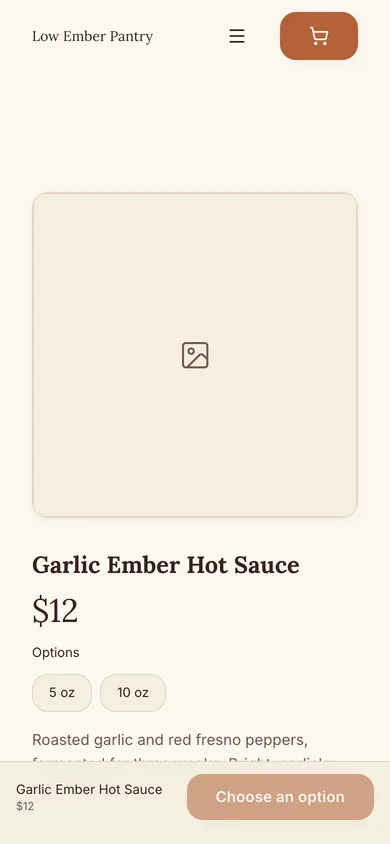
On the site, a product with variants shows a picker above the buy button, which reads Choose an option until the shopper picks one. Then it reads Add to cart with that variant's price.

4. Order the list
The grid shows products in the order of the list, featured ones first. Drag is not here yet; set sortOrder through the connector or the API to move one. Delete a product from its page with the bin icon; nertia asks Delete this product? first.
Done
Your products are on the site, with variants where you need them. Next: connect Stripe if you have not, then test a checkout.
Problems
- The card still says "Add to cart" but nothing happens. The store is not open yet. Connect Stripe; connecting opens the store and switches the cards on.
- I set a product to sold out but it still shows. Sold out products stay on the grid with the mark, so a returning shopper finds them. Delete the product to remove it.
- Prices show in the wrong currency. Stores are in US dollars for now.